Saturday, May 14, 2016

[ Android App Wallpaper ] Girl Wallpaper


Loved by 80,000,000 users worldwide. Daily updates of free and awesome wallpapers
- The World no.1 Backgrounds App Loved by more than 80,000,000 users World-wide!
- This FREE App provides Unique & Supreme collection of more than 8,000 Images for your screen.
- You can Enjoy our Awesome Contents with Simple UI and Great performance.
- Backgrounds HD has received reviews from 1,800,000 people rating average of 4.6/5.0
- Daily updates of Wallpapers selected by VIETGIT staffs. Guarantee the most stunning Wallpapers you've ever seen.


Backgrounds HD features
Google material design
- We offer you Android 5.0’s simple interface and minimized designs.
Simple, fast and light
- Backgrounds HD more focuses on wallpaper image itself, to make greater performance. 
- You would never have to worry about your memories or battery running out.
Picking wallpapers
- Brand new, beautiful wallpapers updated everyday.
- Check out the hottest wallpapers selected by users worldwide.
- All the images include artist’s information, license details and URL of the artist’s webpage. 
- More than 30 categories for easy searching. Also provides keywords searching too.
Categories in Backgrounds HD:
Airplane, Animal, Autumn, Brand, Buildings, Cars, Cats and Dogs, City, Colorful, Fantasy, Flowers, Food, Game, Girly, Heart, Illustration, Love, Monochrome, Mountain, Music, Nature, Night View, Paintings, Patterns, People, Pink, Portrait Mode, Quotes, Rain, Red, Sea, Sky, Sports, Spring, Summer, Sunset, Texture, Travel, Trees, Universe, Vintage, Winter
Setting wallpapers
- Cropping images, filters and various set as wallpapers modes (standard, entire, fixed, scrollable and more) available. 
- Keep the favorite images by easily saving them to your own device.
- Share images to anyone and any other applications in simple way.
Favorites and histories
- Keep your own favorites and histories.

Link download from Google Play Store: 

https://upload.wikimedia.org/wikipedia/en/thumb/7/77/Android-app-on-google-play.svg/220px-Android-app-on-google-play.svg.png
HD Wallpaper Sexy Girl 


Contacts
-  sonpxvn@gmail.com

Copyright © 2011-2015 VietGIT Corp., Inc. All rights reserved.

Thursday, September 20, 2012

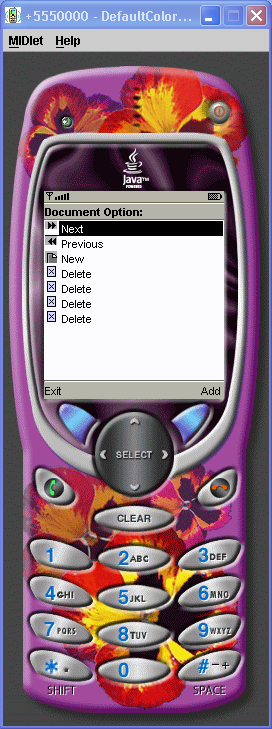
Various Event


/*--------------------------------------------------
* ImplicitList.java
*
* Example from the book:     Core J2ME Technology
* Copyright John W. Muchow   http://www.CoreJ2ME.com
* You may use/modify for any non-commercial purpose
*-------------------------------------------------*/
import javax.microedition.midlet.*;
import javax.microedition.lcdui.*;

public class ImplicitList extends MIDlet implements CommandListener
{
  private Display display;      // Reference to Display object
  private List lsDocument;     // Main list
  private Command cmExit;      // Command to exit
  private Command cmAdd;       // Command to add an element
  
  public ImplicitList()
  {
    display = Display.getDisplay(this);

    // Create the Commands
    cmExit = new Command("Exit", Command.EXIT, 1);
    cmAdd = new Command("Add", Command.SCREEN, 1);

    try 
    
      // Create array of image objects
      Image images[] {Image.createImage("/ff.png")
                        Image.createImage("/rr.png"),
                        Image.createImage("/new.png")};            
                        
      // Create array of corresponding string objects                                                
      String options[] {" Next"" Previous"" New"};          

      // Create list using arrays, add commands, listen for events
      lsDocument = new List("Document Option:"
                             List.IMPLICIT, options, images)
      lsDocument.addCommand(cmExit);
      lsDocument.addCommand(cmAdd);
      lsDocument.setCommandListener(this);
    }
    catch (java.io.IOException e)
    {
      System.err.println("Unable to locate or read .png file");
    }
  }
      
  public void startApp() 
  {
    display.setCurrent(lsDocument);
  }
  
  public void pauseApp()
  {
  }
     
  public void destroyApp(boolean unconditional)
  {
  }

  public void commandAction(Command c, Displayable s)
  {
    // If an implicit list generated the event
    if (c == List.SELECT_COMMAND)
    {
      switch (lsDocument.getSelectedIndex())
      {
        case 0:
          System.out.println("Next");
          break;
  
        case 1:
          System.out.println("Previous");
          break;
          
        case 2:
          System.out.println("New");
          break;        
        default:
          System.out.println("New Element");
      }
    }
    else if (c == cmAdd)
    {
      try
      {
        
        System.out.println("lsDocument.size():" + lsDocument.size());
        // Add a new element. Using size() as the insertion point,
        // the element will appended to the list.
        lsDocument.insert(lsDocument.size()" Delete "
                           Image.createImage("/delete.png"));
      }
      catch (java.io.IOException e)
      {
        System.err.println("Unable to locate or read .png file");
      
    }
    else if (c == cmExit)
    {
      destroyApp(false);
      notifyDestroyed();
    
  }
}

Retrieve system properties in a Midlet

import javax.microedition.lcdui.Display;
import javax.microedition.lcdui.Displayable;
import javax.microedition.lcdui.Form;
import javax.microedition.midlet.MIDlet;

/* Creates the "Hello world" program in J2ME MIDP.
Note that the class must be public so that the device
application management software can instantiate it. */

public class HelloWorld extends MIDlet
{

  public void startApp() {

    // Create a Displayable widget.
    form = new Form("Hello World");
    // Add a string to the form.
    String msg = "My first MIDlet!";
    form.append(msg);
    // This app simply displays the single form created
    // above.
    display = Display.getDisplay(this);
    display.setCurrent(form);
    printSystemProperties();

  }


/* Prints the values of the standard system properties
using the System.getProperty() call. */

  protected void printSystemProperties()
  {

    String conf;
    String profiles;
    String platform;
    String encoding;
    String locale;

    conf = System.getProperty("microedition.configuration");
    System.out.println(conf);

    profiles = System.getProperty("microedition.profiles");
    System.out.println(profiles);

    platform = System.getProperty("microedition.platform");
    System.out.println(platform);

    encoding = System.getProperty("microedition.encoding");
    System.out.println(encoding);

    locale = System.getProperty("microedition.locale");
    System.out.println(locale);
    System.out.println();
  }
}