Thursday, September 20, 2012
Various Event
/*--------------------------------------------------
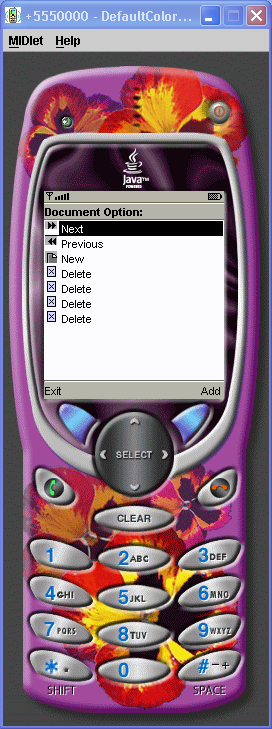
* ImplicitList.java
*
* Example from the book: Core J2ME Technology
* Copyright John W. Muchow http://www.CoreJ2ME.com
* You may use/modify for any non-commercial purpose
*-------------------------------------------------*/
import javax.microedition.midlet.*;
import javax.microedition.lcdui.*;
public class ImplicitList extends MIDlet implements CommandListener
{
private Display display; // Reference to Display object
private List lsDocument; // Main list
private Command cmExit; // Command to exit
private Command cmAdd; // Command to add an element
public ImplicitList()
{
display = Display.getDisplay(this);
// Create the Commands
cmExit = new Command("Exit", Command.EXIT, 1);
cmAdd = new Command("Add", Command.SCREEN, 1);
try
{
// Create array of image objects
Image images[] = {Image.createImage("/ff.png"),
Image.createImage("/rr.png"),
Image.createImage("/new.png")};
// Create array of corresponding string objects
String options[] = {" Next", " Previous", " New"};
// Create list using arrays, add commands, listen for events
lsDocument = new List("Document Option:",
List.IMPLICIT, options, images);
lsDocument.addCommand(cmExit);
lsDocument.addCommand(cmAdd);
lsDocument.setCommandListener(this);
}
catch (java.io.IOException e)
{
System.err.println("Unable to locate or read .png file");
}
}
public void startApp()
{
display.setCurrent(lsDocument);
}
public void pauseApp()
{
}
public void destroyApp(boolean unconditional)
{
}
public void commandAction(Command c, Displayable s)
{
// If an implicit list generated the event
if (c == List.SELECT_COMMAND)
{
switch (lsDocument.getSelectedIndex())
{
case 0:
System.out.println("Next");
break;
case 1:
System.out.println("Previous");
break;
case 2:
System.out.println("New");
break;
default:
System.out.println("New Element");
}
}
else if (c == cmAdd)
{
try
{
System.out.println("lsDocument.size():" + lsDocument.size());
// Add a new element. Using size() as the insertion point,
// the element will appended to the list.
lsDocument.insert(lsDocument.size(), " Delete ",
Image.createImage("/delete.png"));
}
catch (java.io.IOException e)
{
System.err.println("Unable to locate or read .png file");
}
}
else if (c == cmExit)
{
destroyApp(false);
notifyDestroyed();
}
}
}
Retrieve system properties in a Midlet
import javax.microedition.lcdui.Display;
import javax.microedition.lcdui.Displayable;
import javax.microedition.lcdui.Form;
import javax.microedition.midlet.MIDlet;
/* Creates the "Hello world" program in J2ME MIDP.
Note that the class must be public so that the device
application management software can instantiate it. */
public class HelloWorld extends MIDlet
{
public void startApp() {
// Create a Displayable widget.
form = new Form("Hello World");
// Add a string to the form.
String msg = "My first MIDlet!";
form.append(msg);
// This app simply displays the single form created
// above.
display = Display.getDisplay(this);
display.setCurrent(form);
printSystemProperties();
}
/* Prints the values of the standard system properties
using the System.getProperty() call. */
protected void printSystemProperties()
{
String conf;
String profiles;
String platform;
String encoding;
String locale;
conf = System.getProperty("microedition.configuration");
System.out.println(conf);
profiles = System.getProperty("microedition.profiles");
System.out.println(profiles);
platform = System.getProperty("microedition.platform");
System.out.println(platform);
encoding = System.getProperty("microedition.encoding");
System.out.println(encoding);
locale = System.getProperty("microedition.locale");
System.out.println(locale);
System.out.println();
}
}
import javax.microedition.lcdui.Displayable;
import javax.microedition.lcdui.Form;
import javax.microedition.midlet.MIDlet;
/* Creates the "Hello world" program in J2ME MIDP.
Note that the class must be public so that the device
application management software can instantiate it. */
public class HelloWorld extends MIDlet
{
public void startApp() {
// Create a Displayable widget.
form = new Form("Hello World");
// Add a string to the form.
String msg = "My first MIDlet!";
form.append(msg);
// This app simply displays the single form created
// above.
display = Display.getDisplay(this);
display.setCurrent(form);
printSystemProperties();
}
/* Prints the values of the standard system properties
using the System.getProperty() call. */
protected void printSystemProperties()
{
String conf;
String profiles;
String platform;
String encoding;
String locale;
conf = System.getProperty("microedition.configuration");
System.out.println(conf);
profiles = System.getProperty("microedition.profiles");
System.out.println(profiles);
platform = System.getProperty("microedition.platform");
System.out.println(platform);
encoding = System.getProperty("microedition.encoding");
System.out.println(encoding);
locale = System.getProperty("microedition.locale");
System.out.println(locale);
System.out.println();
}
}
Subscribe to:
Comments (Atom)